











How can I turn the low light LED Off my Dahua Camera?

Step 1. Download and install the configtool – https://dahuawiki.com/ConfigTool this tool allows you to find the IP address of the NVR.


Step 2. Type the IP address into a browser, and use your login details to log into the system Note your PC must be using the same wifi as the NVR.


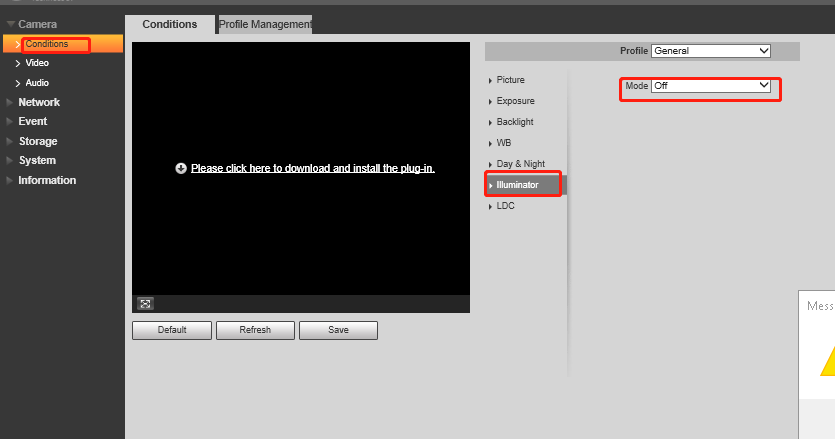
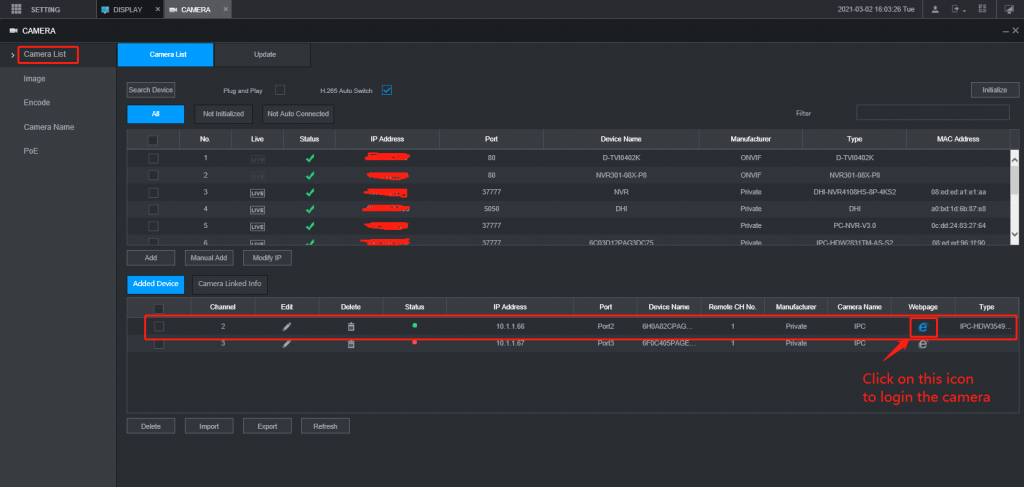
Step 3. the following step is: click on setting=> Camera list=> click on camera webpage as below, then you can web log in to the camera and turn white light off  by changing the illuminator mode to off mode.

Order by 15 Dec for pre-Christmas deliveries (in-stock items only). Use Code: MERRY at checkout for final 2025 savings!
Last day for courier despatch is 22 Dec before we take a short break.
Trade Customers: Log In or Register to Unlock Even Better Prices.

Save & Share Cart
Your Shopping Cart will be saved and you'll be given a link. You, or anyone with the link, can use it to retrieve your Cart at any time.
Back Save & Share Cart
Your Shopping Cart will be saved with Product pictures and information, and Cart Totals. Then send it to yourself, or a friend, with a link to retrieve it at any time.
Your cart email sent successfully :)